FileMerlin
™
- Advanced File Conversion Software
file-convert.com
a division of Advanced Computer Innovations, Inc.
70 Office Park Way • Pittsford, NY 14534-1746 (USA)
Phone or text: 585-510-3890 • Email: click here
Overview
FileMerlin ™ accurately converts word processing, spreadsheet, presentation and data base files between a very wide range of file formats. Widely regarded as the premier document conversion product, it is suitable for straightforward as well as complex documents, and is the most accurate, complete and flexible such solution we know of.Suitable for all kinds of documents
• Legal documents demanding critical conversion accuracy • Technical documents • Documents with embedded functionality (mail-merge, field codes, etc) • Financial documents with complex tables, embedded spreadsheets, charts, etc. • Many other kinds of word processing, spreadsheet and data filesConverts practically all popular file formats
• All popular old and new file formats in their native form • Handles native Microsoft Office .doc, .docx and .docm files • Converts to PDF without requiring documents to be opened in their host application • Converts PDF files to word processor file formats, including “smart” conversion to flowing text • Supports all commonly used text coding (ASCII, ANSI, Unicode, Dos code pages, etc.) • Last-resort text recovery from any kind of file (even corrupted files)High Conversion Accuracy and Completeness
• Converts headers, footers, footnotes, endnotes, pagination, outline numbering, and many other such functions • Excellent conversion of tables, including borders, shading, merged cells and other complex layout • Converts graphics, spreadsheets and PowerPoint presentations embedded or linked in documents • Converts mail/merge fields, bookmarks, hyperlinks, symbols, special characters, etc. • Converts and preserves table of contents and index references • Preserves document logic and functionality, revision markings, tracked changes, etc. • Conversion log lists conversion exceptions, if anyIntuitive, Flexible, and Easy to Use
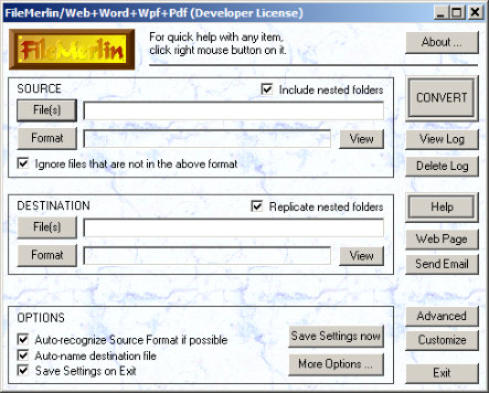
• Easy to install and uninstall • Interactive and batch modes, with ability to convert thousands of files and nested folders at a time • Option to ignore non-qualifying files during bulk conversion • Flexibility in naming and placing converted files, including replication of folder structure • Conversion speed as high as 50 pages per second • Extensive one-click quick-help, as well as detailed on-line help, for maximum ease of useCustomizable for Special Requirements
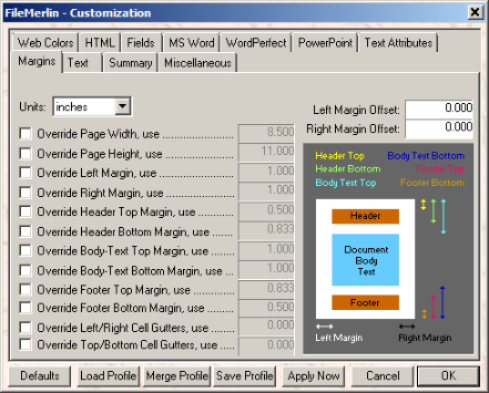
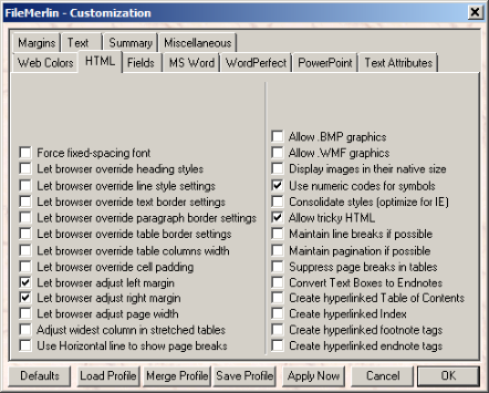
• Automatic Font Translation to use fonts available in newer programs • Update character formatting to automatically use new features in modern programs • Easy customization with tabbed dialog boxes, without scripts or programming • Advanced users may customize 1000+ parameters for very exacting requirementsAdvanced Options for Software Developers and IT Professionals
• Option to automatically convert files as they arrive in specific folders • API available for developers and programmers • InterScript ™ language support for rich content extraction and conversionFile Formats
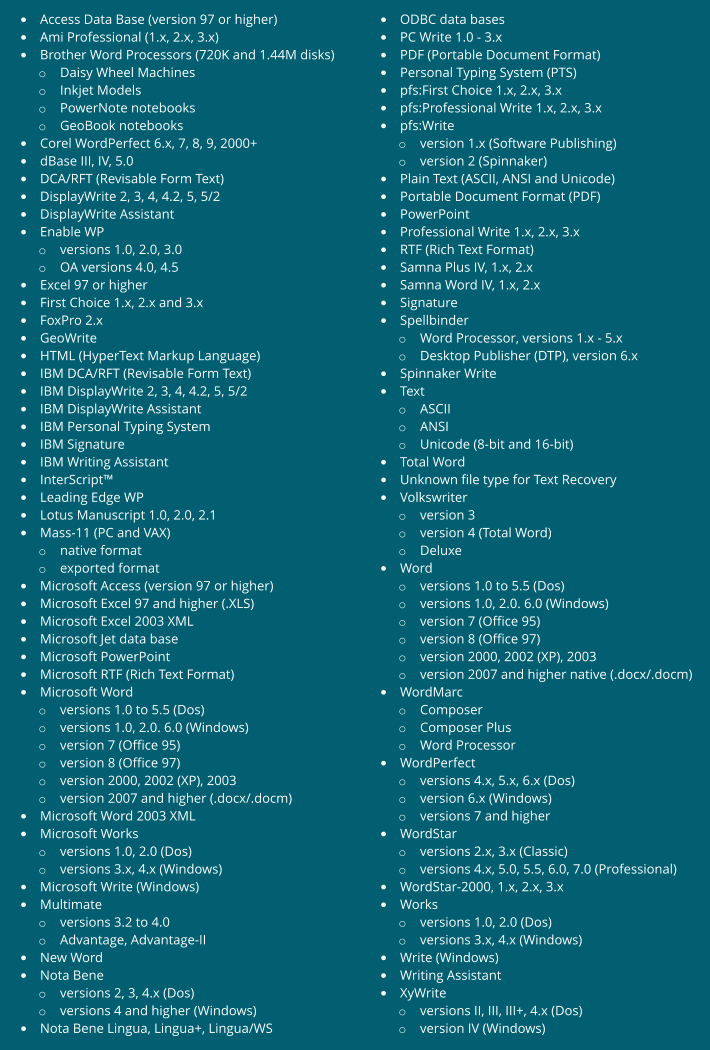
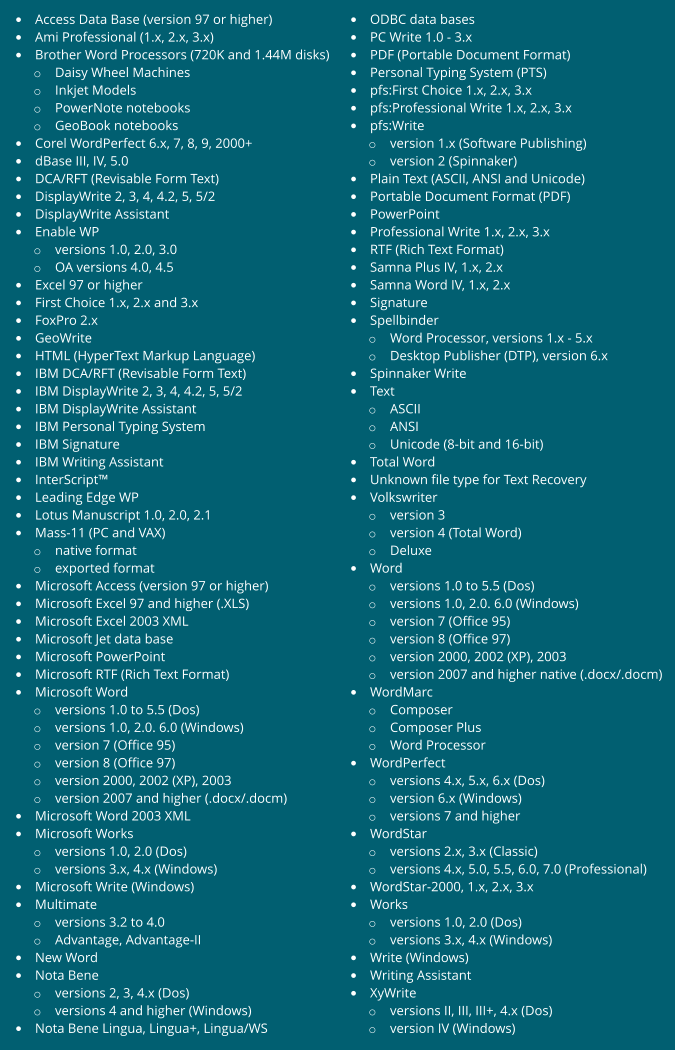
FileMerlin ™ reads files created by more than 100 different major word processor, data base and spreadsheet applications (including legacy and modern products), and converts them to any of these four popular modern environments: • Microsoft (Word) • Corel (WordPerfect) • Adobe (PDF) • Generic (such as HTML) You can select the environment(s) you want to convert to when ordering the product, and can select one, several or all environments.Source File Formats (Conversion from)
•
Overview
•
File Formats
o
Source formats
o
Destination formats
•
Pricing
•
Download for free trial
Notes on Source Formats:
• IBM DisplayWrite is not the same as IBM Displaywriter. The former was PC-based software, whose documents can be converted using FileMerlin ™ . The latter was dedicated word processing hardware which used 8" floppy disks. To convert 8" Displaywriter disks, please visit our Media Conversion website. • For many years, Nota Bene and Lingua Workstation included import/export filters developed by Advanced Computer Innovations, Inc. These filters are no longer licensed to Nota Bene, • pfs:First Choice was an integrated software package for PC-compatible computers, designed to run under MS-Dos. It included word processing, data base, spreadsheet and other modules. To convert pfs:First Choice word processing documents, use FileMerlin ™ . To convert pfs:First Choice database files, use FirstOut ™ . Note that First Choice database files always have .FOL extension. • The earliest versions of Spellbinder and WordStar ran on CP/M computers. CP/M disks are not readable on PCs. However, if you transfer the documents from CP/M media to a PC, then FileMerlin ™ can convert them to work with modern PC-based programs. For more information on converting CP/M media to something useable on a PC, please visit our Media Conversion website.Destination Formats (Conversion to)
The file formats you can convert to within each destination environment are listed below. You can select the environment(s) you want to convert to when ordering the product, and can select one, several or all environments.Microsoft environment (Word function)
• Microsoft Word 97 or higher (.DOC files) • Microsoft Office 2003 XML • Microsoft RTF (Rich Text Format) • Text (ASCII, ANSI, Unicode & special coding) o Formatted o Unformatted • Comma-separated, tab-separated, etc. • InterScript ™ Since all modern versions of Microsoft Word read .DOC files, FileMerlin may be used to convert documents to any version of Microsoft Word (97 through 2013).Corel environment (WordPerfect function)
• Corel WordPerfect (any version) • WordPerfect 6 or higher (Windows) • WordPerfect 6 for Dos • Text (ASCII, ANSI, Unicode & special coding) o Formatted o Unformatted • Comma-separated, tab-separated, etc. • InterScript ™Adobe environment (PDF function)
• PDF (Portable Document Format) • Text (ASCII, ANSI, Unicode & special coding) o Formatted o Unformatted • Comma-separated, tab-separated, etc. • InterScript ™Generic environment (Web function)
• HTML (HyperText Markup Language) - for web pages • Text (ASCII, ANSI, Unicode & special coding) o Formatted o Unformatted • Comma-separated, tab-separated, etc. • InterScript ™Comparision with Word and WordPerfect built-in import/export filters
FileMerlin ™ offers much more than Word's and WordPerfect’s built-in import/export filters: • You can convert thousands of files in one operation. • It lets you customize the conversions. • It is a stand-alone product, which does not require Word or any other software to be installed. • It converts many more file formats than Word's built-in filters. • In many cases, it converts a lot more accurately than Word's built-in filters. It is also a lot faster.Pricing
The price depends on the type of license, and the destination environment(s) you license: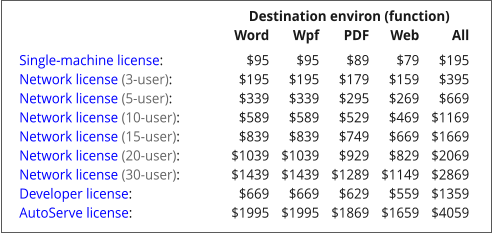
For example, the single-machine license with Word destination function ($95) lets you convert any of the 100+ source formats to any of the
Microsoft environment formats (including Word). The single-machine license with all destination functions ($195) lets you convert any source
format to any destination format, and is our most popular configuration.
Download for Free Trial
FileMerlin ™ may be downloaded for free trial prior to purchase. In trial mode, it introduces misspellings in the converted files, but works in every other way like a fully licensed version, letting you fully evaluate the product for your particular requirements before purchasing. Once the product is enabled by purchasing a license key, these limitations are removed and the product is non-returnable.

Compatible
with
Windows XP
thru Win 11
(32- & 64-bit)











FileMerlin
™
- Advanced File Conversion Software
file-convert.com
a division of Advanced Computer Innovations, Inc.
70 Office Park Way • Pittsford, NY 14534-1746 (USA)
Phone or text: 585-510-3890 • Email: click here
Overview
FileMerlin ™ accurately converts word processing, spreadsheet, presentation and data base files between a very wide range of file formats. Widely regarded as the premier document conversion product, it is suitable for straightforward as well as complex documents, and is the most accurate, complete and flexible such solution we know of.Suitable for all kinds of documents
• Legal documents demanding critical conversion accuracy • Technical documents • Documents with embedded functionality (mail-merge, field codes, etc) • Financial documents with complex tables, embedded spreadsheets, charts, etc. • Many other kinds of word processing, spreadsheet and data filesConverts practically all popular file formats
• All popular old and new file formats in their native form • Handles native Microsoft Office .doc, .docx and .docm files • Converts to PDF without requiring documents to be opened in their host application • Converts PDF files to word processor file formats, including “smart” conversion to flowing text • Supports all commonly used text coding (ASCII, ANSI, Unicode, Dos code pages, etc.) • Last-resort text recovery from any kind of file (even corrupted files)High Conversion Accuracy and Completeness
• Converts headers, footers, footnotes, endnotes, pagination, outline numbering, and many other such functions • Excellent conversion of tables, including borders, shading, merged cells and other complex layout • Converts graphics, spreadsheets and PowerPoint presentations embedded or linked in documents • Converts mail/merge fields, bookmarks, hyperlinks, symbols, special characters, etc. • Converts and preserves table of contents and index references • Preserves document logic and functionality, revision markings, tracked changes, etc. • Conversion log lists conversion exceptions, if anyIntuitive, Flexible, and Easy to Use
• Easy to install and uninstall • Interactive and batch modes, with ability to convert thousands of files and nested folders at a time • Option to ignore non-qualifying files during bulk conversion • Flexibility in naming and placing converted files, including replication of folder structure • Conversion speed as high as 50 pages per second • Extensive one-click quick-help, as well as detailed on-line help, for maximum ease of useCustomizable for Special Requirements
• Automatic Font Translation to use fonts available in newer programs • Update character formatting to automatically use new features in modern programs • Easy customization with tabbed dialog boxes, without scripts or programming • Advanced users may customize 1000+ parameters for very exacting requirementsAdvanced Options for Software Developers and IT Professionals
• Option to automatically convert files as they arrive in specific folders • API available for developers and programmers • InterScript ™ language support for rich content extraction and conversionFile Formats
FileMerlin ™ reads files created by more than 100 different major word processor, data base and spreadsheet applications (including legacy and modern products), and converts them to any of these four popular modern environments: • Microsoft (Word) • Corel (WordPerfect) • Adobe (PDF) • Generic (such as HTML) You can select the environment(s) you want to convert to when ordering the product, and can select one, several or all environments.Source File Formats (Conversion from)
•
Overview
•
File Formats
o
Source formats
o
Destination formats
•
Pricing
•
Download for free trial
Notes on Source Formats:
• IBM DisplayWrite is not the same as IBM Displaywriter. The former was PC-based software, whose documents can be converted using FileMerlin ™ . The latter was dedicated word processing hardware which used 8" floppy disks. To convert 8" Displaywriter disks, please visit our Media Conversion website. • For many years, Nota Bene and Lingua Workstation included import/export filters developed by Advanced Computer Innovations, Inc. These filters are no longer licensed to Nota Bene, • pfs:First Choice was an integrated software package for PC-compatible computers, designed to run under MS-Dos. It included word processing, data base, spreadsheet and other modules. To convert pfs:First Choice word processing documents, use FileMerlin ™ . To convert pfs:First Choice database files, use FirstOut ™ . Note that First Choice database files always have .FOL extension. • The earliest versions of Spellbinder and WordStar ran on CP/M computers. CP/M disks are not readable on PCs. However, if you transfer the documents from CP/M media to a PC, then FileMerlin ™ can convert them to work with modern PC-based programs. For more information on converting CP/M media to something useable on a PC, please visit our Media Conversion website.Destination Formats (Conversion to)
The file formats you can convert to within each destination environment are listed below. You can select the environment(s) you want to convert to when ordering the product, and can select one, several or all environments.Microsoft environment (Word function)
• Microsoft Word 97 or higher (.DOC files) • Microsoft Office 2003 XML • Microsoft RTF (Rich Text Format) • Text (ASCII, ANSI, Unicode & special coding) o Formatted o Unformatted • Comma-separated, tab-separated, etc. • InterScript ™ Since all modern versions of Microsoft Word read .DOC files, FileMerlin may be used to convert documents to any version of Microsoft Word (97 through 2013).Corel environment (WordPerfect function)
• Corel WordPerfect (any version) • WordPerfect 6 or higher (Windows) • WordPerfect 6 for Dos • Text (ASCII, ANSI, Unicode & special coding) o Formatted o Unformatted • Comma-separated, tab-separated, etc. • InterScript ™Adobe environment (PDF function)
• PDF (Portable Document Format) • Text (ASCII, ANSI, Unicode & special coding) o Formatted o Unformatted • Comma-separated, tab-separated, etc. • InterScript ™Generic environment (Web function)
• HTML (HyperText Markup Language) - for web pages • Text (ASCII, ANSI, Unicode & special coding) o Formatted o Unformatted • Comma-separated, tab-separated, etc. • InterScript ™Comparision with Word and WordPerfect built-in import/export filters
FileMerlin ™ offers much more than Word's and WordPerfect’s built-in import/export filters: • You can convert thousands of files in one operation. • It lets you customize the conversions. • It is a stand-alone product, which does not require Word or any other software to be installed. • It converts many more file formats than Word's built-in filters. • In many cases, it converts a lot more accurately than Word's built-in filters. It is also a lot faster.Pricing
The price depends on the type of license, and the destination environment(s) you license:
For example, the single-machine license with Word destination function ($95) lets you convert any of the
100+ source formats to any of the Microsoft environment formats (including Word). The single-machine
license with all destination functions ($195) lets you convert any source format to any destination format,
and is our most popular configuration.
Download for Free Trial
FileMerlin ™ may be downloaded for free trial prior to purchase. In trial mode, it introduces misspellings in the converted files, but works in every other way like a fully licensed version, letting you fully evaluate the product for your particular requirements before purchasing. Once the product is enabled by purchasing a license key, these limitations are removed and the product is non-returnable.
Compatible
with
Windows XP
thru Win 11
(32- & 64-bit)


FileMerlin
™
file-convert.com
a division of Advanced Computer Innovations, Inc.
70 Office Park Way • Pittsford, NY 14534-1746 (USA)
Phone or text: 585-510-3890 • Email: click here
Overview
FileMerlin ™ accurately converts word processing, spreadsheet, presentation and data base files between a very wide range of file formats. Widely regarded as the premier document conversion product, it is suitable for straightforward as well as complex documents, and is the most accurate, complete and flexible such solution we know of.Suitable for all kinds of documents
• Legal documents demanding critical conversion accuracy • Technical documents • Documents with embedded functionality (mail- merge, field codes, etc) • Financial documents with complex tables, embedded spreadsheets, charts, etc. • Many other kinds of word processing, spreadsheet and data filesConverts practically all popular file formats
• All popular old and new file formats in their native form • Handles native Microsoft Office .doc, .docx and .docm files • Converts to PDF without requiring documents to be opened in their host application • Converts PDF files to word processor file formats, including “smart” conversion to flowing text • Supports all commonly used text coding (ASCII, ANSI, Unicode, Dos code pages, etc.) • Last-resort text recovery from any kind of file (even corrupted files)High Conversion Accuracy and Completeness
• Converts headers, footers, footnotes, endnotes, pagination, outline numbering, and many other such functions • Excellent conversion of tables, including borders, shading, merged cells and other complex layout • Converts graphics, spreadsheets and PowerPoint presentations embedded or linked in documents • Converts mail/merge fields, bookmarks, hyperlinks, symbols, special characters, etc. • Converts and preserves table of contents and index references • Preserves document logic and functionality, revision markings, tracked changes, etc. • Conversion log lists conversion exceptions, if anyIntuitive, Flexible, and Easy to Use
• Easy to install and uninstall • Interactive and batch modes, with ability to convert thousands of files and nested folders at a time • Option to ignore non-qualifying files during bulk conversion • Flexibility in naming and placing converted files, including replication of folder structure • Conversion speed as high as 50 pages per second • Extensive one-click quick-help, as well as detailed on-line help, for maximum ease of useCustomizable for Special Requirements
• Automatic Font Translation to use fonts available in newer programs • Update character formatting to automatically use new features in modern programs • Easy customization with tabbed dialog boxes, without scripts or programming • Advanced users may customize 1000+ parameters for very exacting requirementsAdvanced Options for Software Developers and IT
Professionals
• Option to automatically convert files as they arrive in specific folders • API available for developers and programmers • InterScript ™ language support for rich content extraction and conversionFile Formats
FileMerlin ™ reads files created by more than 100 different major word processor, data base and spreadsheet applications (including legacy and modern products), and converts them to any of these four popular modern environments: • Microsoft (Word) • Corel (WordPerfect) • Adobe (PDF) • Generic (such as HTML) You can select the environment(s) you want to convert to when ordering the product, and can select one, several or all environments.Source File Formats (Conversion from)
•
Overview
•
File Formats
o
Source formats
o
Destination formats
•
Pricing
•
Download for free trial

Notes on Source Formats:
• IBM DisplayWrite is not the same as IBM Displaywriter. The former was PC-based software, whose documents can be converted using FileMerlin ™ . The latter was dedicated word processing hardware which used 8" floppy disks. To convert 8" Displaywriter disks, please visit our Media Conversion website. • For many years, Nota Bene and Lingua Workstation included import/export filters developed by Advanced Computer Innovations, Inc. These filters are no longer licensed to Nota Bene, • pfs:First Choice was an integrated software package for PC-compatible computers, designed to run under MS-Dos. It included word processing, data base, spreadsheet and other modules. To convert pfs:First Choice word processing documents, use FileMerlin ™ . To convert pfs:First Choice database files, use FirstOut ™ . Note that First Choice database files always have .FOL extension. • The earliest versions of Spellbinder and WordStar ran on CP/M computers. CP/M disks are not readable on PCs. However, if you transfer the documents from CP/M media to a PC, then FileMerlin ™ can convert them to work with modern PC-based programs. For more information on converting CP/M media to something useable on a PC, please visit our Media Conversion website.Destination Formats (Conversion to)
The file formats you can convert to within each destination environment are listed below. You can select the environment(s) you want to convert to when ordering the product, and can select one, several or all environments.Microsoft environment (Word function)
• Microsoft Word 97 or higher (.DOC files) • Microsoft Office 2003 XML • Microsoft RTF (Rich Text Format) • Text (ASCII, ANSI, Unicode & special coding) o Formatted o Unformatted • Comma-separated, tab-separated, etc. • InterScript ™ Since all modern versions of Microsoft Word read .DOC files, FileMerlin may be used to convert documents to any version of Microsoft Word (97 through 2013).Corel environment (WordPerfect function)
• Corel WordPerfect (any version) • WordPerfect 6 or higher (Windows) • WordPerfect 6 for Dos • Text (ASCII, ANSI, Unicode & special coding) o Formatted o Unformatted • Comma-separated, tab-separated, etc. • InterScript ™Adobe environment (PDF function)
• PDF (Portable Document Format) • Text (ASCII, ANSI, Unicode & special coding) o Formatted o Unformatted • Comma-separated, tab-separated, etc. • InterScript ™Generic environment (Web function)
• HTML (HyperText Markup Language) - for web pages • Text (ASCII, ANSI, Unicode & special coding) o Formatted o Unformatted • Comma-separated, tab-separated, etc. • InterScript ™Comparision with Word and WordPerfect built-
in import/export filters
FileMerlin ™ offers much more than Word's and WordPerfect’s built-in import/export filters: • You can convert thousands of files in one operation. • It lets you customize the conversions. • It is a stand-alone product, which does not require Word or any other software to be installed. • It converts many more file formats than Word's built-in filters. • In many cases, it converts a lot more accurately than Word's built-in filters. It is also a lot faster.Pricing
The price depends on the type of license, and the destination environment(s) you license: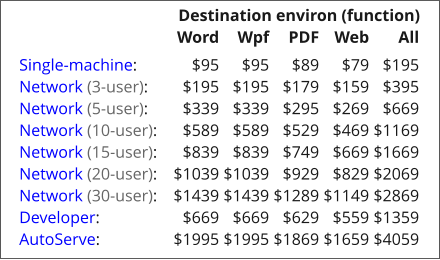
For example, the single-machine license with Word
destination function ($95) lets you convert any of the 100+
source formats to any of the Microsoft environment
formats (including Word). The single-machine license with
all destination functions ($195) lets you convert any source
format to any destination format, and is our most popular
configuration.
Download for Free Trial
FileMerlin ™ may be downloaded for free trial prior to purchase. In trial mode, it introduces misspellings in the converted files, but works in every other way like a fully licensed version, letting you fully evaluate the product for your particular requirements before purchasing. Once the product is enabled by purchasing a license key, these limitations are removed and the product is non-returnable.

Compatible
with
Windows XP
thru Win 11
(32- & 64-bit)